Keychron Review: Are Keychron Keyboards Worth Buying?
September 15, 2026 · 13 min read
Keychron has become one of the better-known names in the mechanical keyboard market,
particularly among buyers who want more customization than a typical office or gaming
keyboard provides. The current lineup spans wireless mechanical keyboards, full-metal
custom boards, Hall Effect gaming keyboards, low-profile models, ergonomic layouts,
split keyboards, and compact designs.
But is Keychron actually worth buying in 2026? The answer depends on the model and what
you need from a keyboard. Keychron’s biggest advantage is variety: the current catalog
gives buyers a choice of layouts, switch technologies, connectivity options, and price
levels. Its biggest drawback is that this same variety can make the buying decision more
complicated than it first appears.
In this Keychron review, we break down the current lineup, compare the major keyboard
families, look at the features that actually matter, examine gaming and productivity use,
and explain which type of buyer is most likely to get good value from Keychron.
Affiliate disclosure:
This article contains an affiliate link. If you purchase through the link, we may earn
a commission at no additional cost to you.
Quick Verdict
Overall:
Keychron is a strong option for buyers who want customizable mechanical keyboards
across a wide range of layouts, price points, and use cases.
Best for:
Programmers, office users, Mac and Windows users, mechanical keyboard enthusiasts,
and gamers who specifically want Hall Effect or high-polling-rate options.
Main strength:
Product variety. Keychron currently offers conventional mechanical keyboards,
wireless custom boards, full-metal Q-series keyboards, V-series models, low-profile
keyboards, ergonomic layouts, and Hall Effect options.
Main limitation:
Keychron is not one single keyboard experience. Specifications can differ substantially
between models, so choosing by brand name alone is not enough.
Best gaming direction:
Look at the HE and HE 8K families if adjustable actuation, Rapid Trigger, or magnetic
switches are priorities.
Best productivity direction:
Start with a familiar 75%, 80%, 96%, or 100% layout depending on whether you need
a numpad and how much desk space you have.
What Is Keychron?
Keychron is a keyboard-focused brand that has built its reputation around mechanical
keyboards with an emphasis on customization, multiple layouts, and compatibility with
both Mac and Windows systems.
Its current catalog is considerably broader than the original compact wireless-keyboard
concept. Keychron’s comparison system now groups keyboards by characteristics such as
2.4 GHz wireless, 8K polling, magnetic switches, full-metal construction, hot-swapping,
ergonomic layouts, QMK/Launcher support, low-profile designs, and other features.
That breadth is useful, but it also means you should think of Keychron as an ecosystem
rather than a single keyboard platform. A K Ultra 8K, V 8K, Q Ultra 8K, and Q HE 8K
are designed around different priorities.
What Can You Buy From Keychron?
Keychron’s current keyboard catalog includes a particularly wide selection of layouts
and technologies. Depending on the product family, buyers can find:
- Compact 60%, 65% and 75% keyboards
- 80% / TKL keyboards
- 96% keyboards
- 100% full-size keyboards
- Alice and ergonomic layouts
- Split keyboards
- Low-profile keyboards
- Wireless mechanical keyboards
- Hall Effect magnetic-switch keyboards
- Hot-swappable keyboards
- High-polling-rate 8K keyboards
- Numpads and other accessories
Keychron’s current comparison page shows this range across the K, V, Q, HE, Ultra 8K,
and other product families. The exact feature combination depends on the individual
model, so buyers should always check the specific product listing before purchasing.
Keychron Keyboard Series Compared
The easiest way to understand Keychron is to compare the major families by what they
are trying to achieve. The following table is a buying guide rather than a replacement
for checking the specifications of a particular model.
| Series | Best For | Typical Focus | Why Consider It? |
|---|---|---|---|
| K / K Ultra | Everyday users, wireless setups | Wireless flexibility and broad layouts | Good balance of features, connectivity, and price |
| V / V 8K / V Ultra | Customization and value | Custom-keyboard features | Strong option when you want more enthusiast features without Q-series pricing |
| Q / Q Ultra | Enthusiasts and premium setups | Full-metal construction and customization | Premium build with extensive customization |
| HE / Q HE 8K | Competitive gaming | Magnetic switches and adjustable actuation | Rapid Trigger and gaming-focused input control on compatible models |
| Low Profile | Portable and slim setups | Reduced keyboard height | Useful if you prefer a thinner typing profile |
| Ergonomic / Alice / Split | Alternative layouts | Ergonomics and unusual form factors | More specialized typing positions and desk setups |
Keychron K Series: A Good Starting Point?
The K family remains one of the easiest places to start if you want a wireless Keychron
without immediately moving into the company’s most premium keyboards.
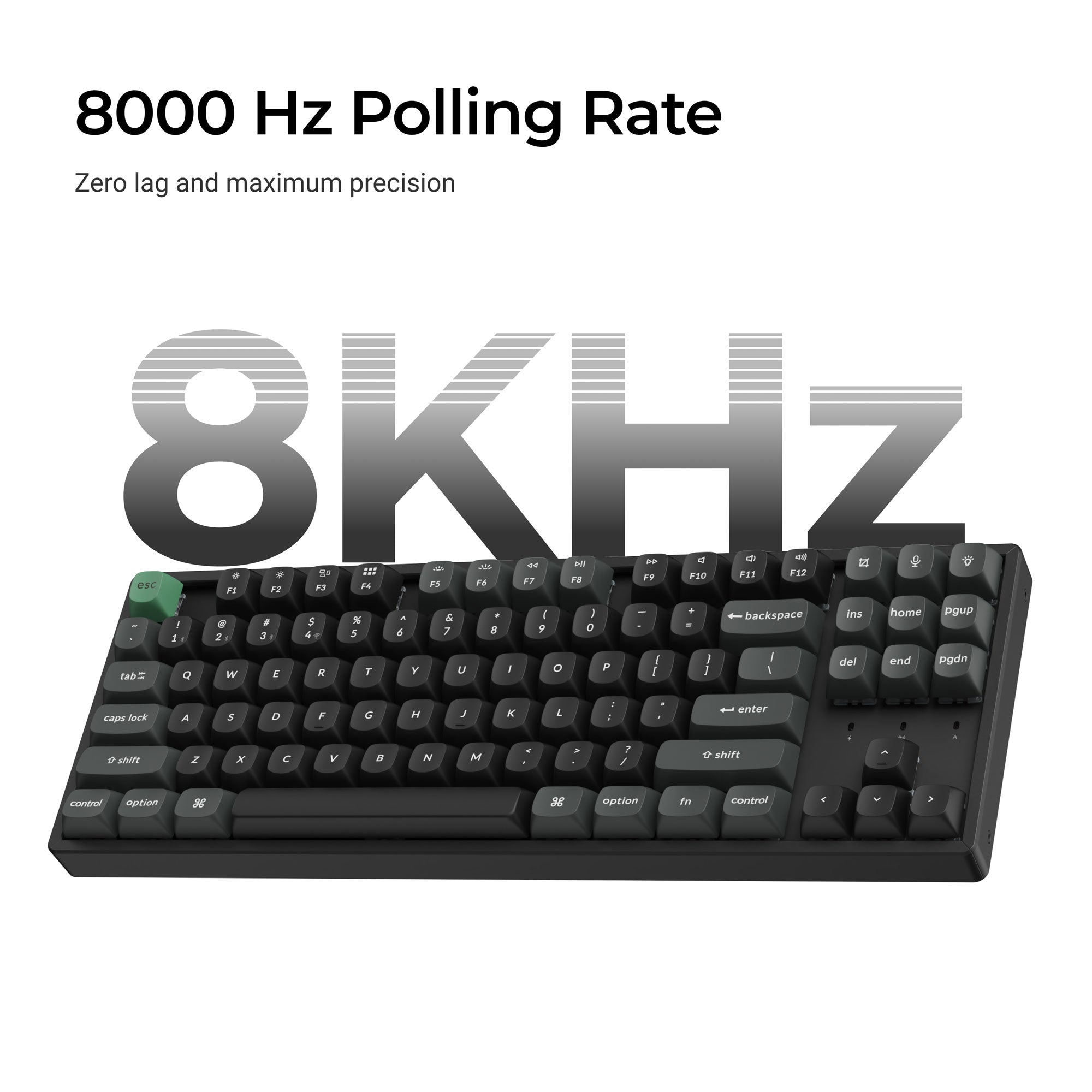
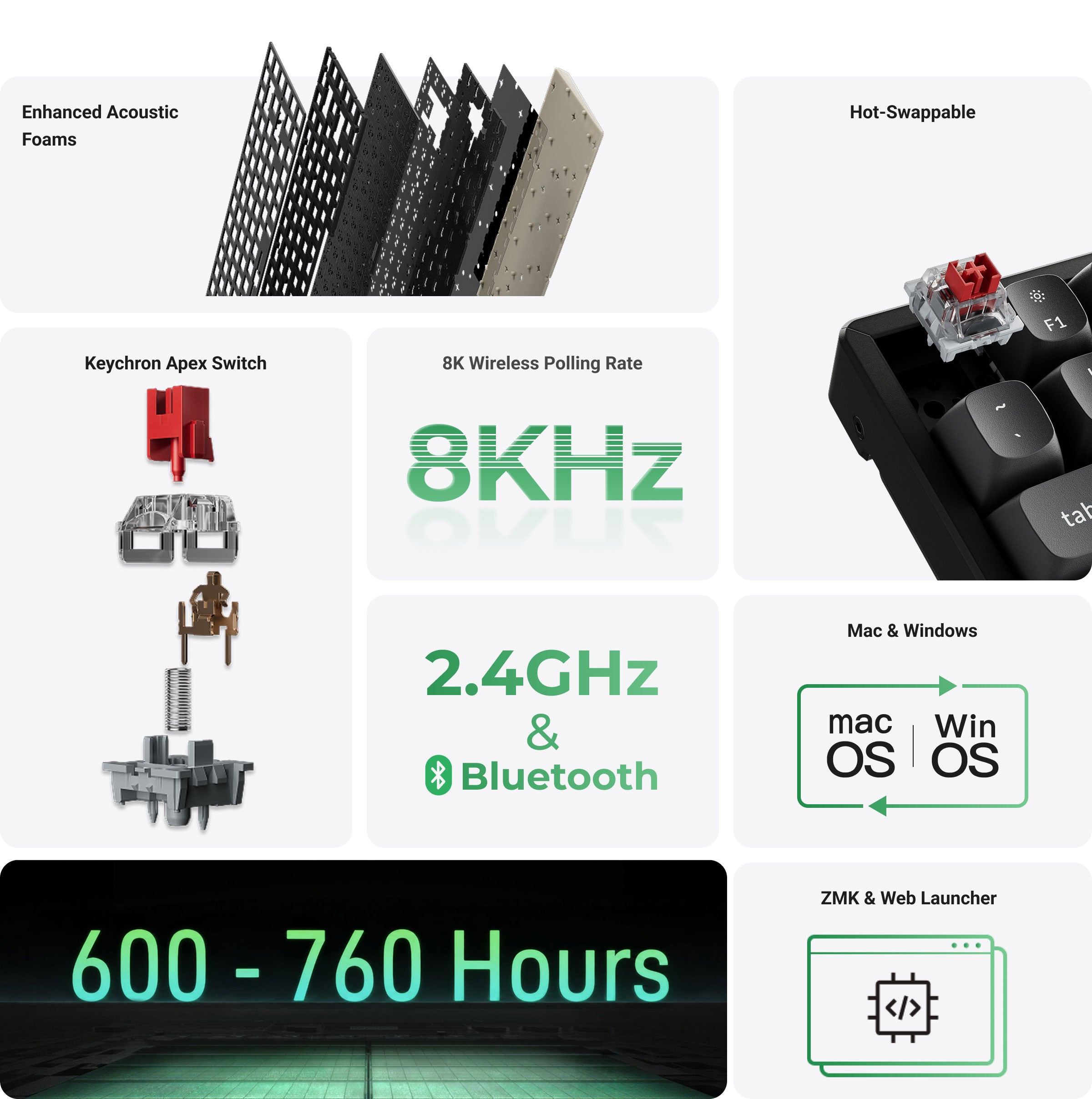
The newer K Ultra 8K family is particularly interesting because it combines 2.4 GHz,
Bluetooth, and wired connectivity with 8K polling and ZMK open-source firmware. Current
models include 75%, 80%, 96%, and full-size layouts, as well as low-profile options.
For example, the K8 Ultra 8K uses an 80% TKL layout and supports wired, Bluetooth 5.2,
and 2.4 GHz connections. Keychron lists up to 760 hours of wireless operation with the
backlight off, while 8K polling is supported in wired and 2.4 GHz modes.
Our take:
The K Ultra range makes the most sense when you want a practical everyday keyboard with
wireless flexibility and modern performance features. You do not need to move to a
premium Q-series model simply because you want wireless connectivity.
Keychron V Series: Better Value for Customization?
The V family is aimed at buyers who want a more customizable keyboard experience while
keeping the price below Keychron’s premium Q range.
The current V 8K lineup includes 75%, 80%, 96%, and full-size models. Keychron currently
lists the V1 8K and V3 8K at $74.99, while the V5 8K and V6 8K are listed at $84.99 on
its U.S.-facing store.
That pricing makes the V family one of the more interesting places to start if your main
goal is customization rather than premium materials.
Our take:
If you want an enthusiast-oriented keyboard without paying Q-series prices, compare
the V models first. For many users, spending more on a Q-series board may be difficult
to justify unless the premium construction and other features matter to them.
Keychron Q Series: Is the Premium Build Worth It?
The Q family sits much closer to the enthusiast end of the mechanical keyboard market.
Keychron’s Q Ultra 8K models use full-metal construction and combine premium construction
with wireless connectivity, hot-swappable switches, and 8K polling.
Current Q Ultra 8K models include the Q1, Q3, Q5, Q6, Q11, and Q13, covering several
layouts including 75%, 80%, 96%, full-size, split, and Alice-style designs.
Current U.S. listings put the Q1 and Q3 Ultra 8K at $229.99, while the Q6, Q5, and Q11
Ultra 8K are listed at $239.99 and the Q13 Ultra 8K at $249.99.
That is a significant jump over the V and K families. The reason to spend more is therefore
not simply “better performance.” It is the combination of construction, customization,
layout options, and premium keyboard design.
Our take:
Q-series keyboards make more sense for enthusiasts and heavy daily users who actually
care about the physical keyboard as part of their desk setup. If you simply need a
reliable mechanical keyboard, the lower-priced families are easier to justify.
Keychron HE Series: Better for Gaming?
If gaming is your priority, the HE family deserves separate attention because Hall Effect
keyboards work differently from conventional mechanical keyboards.
Keychron’s Q HE 8K models use magnetic switches and provide features such as adjustable
actuation, Rapid Trigger, Dynamic Keystrokes, analog input, and other gaming-focused
controls on compatible models.
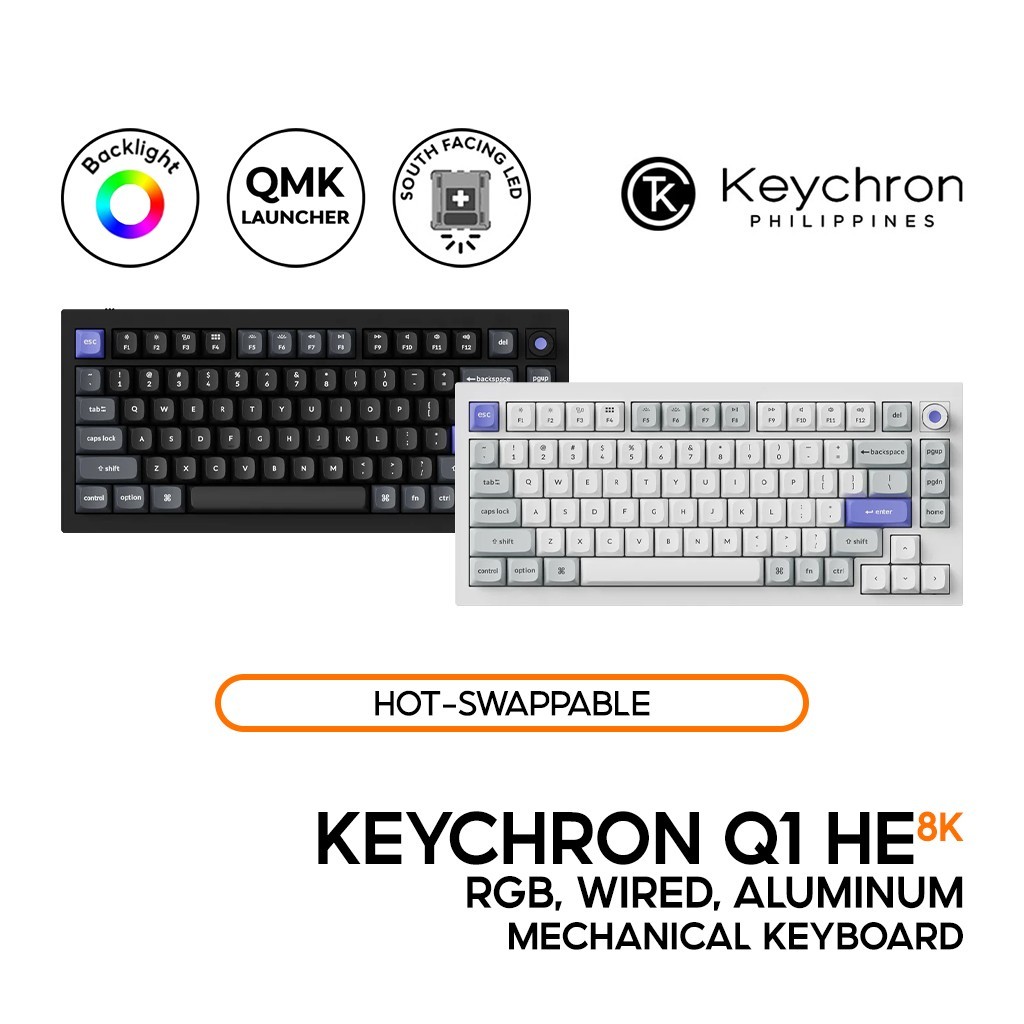
The Q1 HE 8K, for example, is a 75% wired keyboard with an aluminum body, magnetic
switches, adjustable actuation from 0.1 to 3.35 mm, Rapid Trigger, Dynamic Keystrokes,
and an 8K polling mode.
This makes the HE lineup fundamentally different from simply buying a conventional
mechanical keyboard with a high polling rate.
Our take:
If you play competitive FPS games and specifically want adjustable actuation or
Rapid Trigger, HE is the Keychron family to investigate. If you mainly type, browse,
code, and occasionally play games, a conventional mechanical keyboard may be simpler
and more versatile.
Explore Keychron HE Keyboards →
Why Keychron’s 75% Keyboards Are Worth Considering
The 75% layout is one of the most practical compromises for a general-purpose mechanical
keyboard. It removes the numpad and some less frequently used keys while keeping the
function row and arrow keys.
Keychron offers multiple 75% models across different families, including K, V, Q, and
HE options.
For someone who wants one keyboard for coding, gaming, browsing, and everyday work,
a 75% keyboard can be a sensible starting point because it preserves many of the keys
people actually use without taking up as much desk space as a full-size board.
Best general recommendation:
If you do not need a numpad and do not specifically want an ultra-compact layout,
start by comparing Keychron’s 75% keyboards.
Keychron Features That Actually Matter
1. Hot-Swappable Switches
Hot-swappable sockets let compatible switches be replaced without soldering. This can
be particularly useful for people who are still experimenting with mechanical switches
because you do not have to permanently commit to the factory switch configuration.
Keychron offers hot-swappable keyboards across multiple families, but compatibility
depends on the model. This is especially important with magnetic HE switches because
they are not interchangeable with conventional MX mechanical switches in the same way.
2. QMK, VIA, ZMK and Launcher
Programmability is one of the reasons Keychron appeals to enthusiasts and programmers.
Depending on the model, Keychron provides QMK/VIA support, ZMK firmware, or its
browser-based Launcher configuration system.
Keychron’s documentation provides firmware and JSON resources for supported families,
while newer keyboards such as the K Ultra 8K and Q Ultra 8K use ZMK and Launcher-based
customization.
If you are buying primarily for coding or productivity, programmable keys can be more
useful than decorative RGB lighting because they let you adapt the keyboard to your
actual workflow.
3. Wireless Connectivity
Wireless support varies considerably across the Keychron catalog. Current K Ultra and
Q Ultra models can combine 2.4 GHz, Bluetooth, and wired connections, while specialized
HE 8K models may prioritize wired operation for high-polling-rate performance.
This is one of the most important specifications to verify before buying. Do not assume
that every Keychron keyboard has the same wireless capabilities simply because it carries
the Keychron name.
4. 8K Polling Rate
Keychron now offers 8K polling across several product families. In simple terms, a
higher polling rate allows a keyboard to report input to the computer more frequently.
That can be attractive for competitive gaming, but it should not be the only reason
you choose a keyboard.
For office work, programming, writing, and general browsing, layout, switch feel,
connectivity, ergonomics, and customization may matter much more than whether a
keyboard reports at 1,000 Hz or 8,000 Hz.
5. Build and Mounting
Construction varies substantially between families. Premium Q models use full-metal
construction, while other Keychron families are designed to provide a lighter or
more affordable alternative.
Some models also use gasket-style mounting or multiple layers of acoustic material.
However, mounting style alone does not determine how a keyboard sounds or feels.
Switches, keycaps, plate material, foam, case construction, and tuning all contribute.
Keychron Pros and Cons
Pros
- Very broad selection of layouts
- Wireless and wired options
- Mac and Windows compatibility on many models
- Hot-swappable keyboards across multiple families
- Hall Effect options for gaming
- 8K polling options
- Programmable keyboards and web-based customization
- Premium full-metal Q-series models
- Low-profile and ergonomic options
- Multiple price levels
Cons
- Large catalog can make choosing difficult
- Specifications vary significantly by model
- Premium Q models can become expensive
- Some advanced features are unnecessary for ordinary office users
- HE magnetic switches are a specialized choice
- International shipping can take longer than buying locally
- Return conditions should be checked before ordering
Is Keychron Good for Gaming?
Yes, but the best Keychron for gaming depends on the type of gamer you are.
A conventional K, V, or Q keyboard can work well for everyday gaming, especially if
you prefer mechanical switches and a compact layout.
Competitive players should look more closely at the HE lineup. Compatible Keychron
HE keyboards provide features such as adjustable actuation and Rapid Trigger, while
the HE 8K models add high-polling-rate wired performance.
For competitive FPS gaming, pay particular attention to:
- Magnetic switch implementation
- Adjustable actuation range
- Rapid Trigger
- Polling rate
- Connection type
- Software and remapping support
- Keyboard layout
The important point is that an 8K mechanical keyboard and an 8K Hall Effect keyboard
are not the same product category. The HE model’s magnetic sensing is what enables
additional input-control features.
Is Keychron Good for Work and Coding?
Keychron can be an excellent fit for productivity, but the right layout matters more
than the brand name.
A 75% keyboard is a useful compromise if you want a smaller desk footprint while
retaining the function row and arrow keys. An 80% TKL board gives you a familiar
layout without the numpad. A 96% or 100% keyboard is better if you regularly use
numeric-entry keys.
Programmability is another advantage for programmers. Compatible Keychron keyboards
can allow remapping, layers, macros, and customized shortcuts.
If you work in a shared office, however, switch choice deserves more attention.
Mechanical keyboards can be considerably more noticeable than quieter alternatives,
particularly with clicky switches.
Keychron Pricing and Value
Keychron’s value proposition is easier to understand when you look at the range rather
than one individual product.
Current U.S. listings put the V 8K models around $74.99–$84.99, while K Ultra 8K models
currently range from about $109.99 to $119.99 depending on layout.
The premium Q Ultra 8K models are listed around $229.99–$249.99, while Q HE 8K models
are currently listed around $199.99–$239.99 depending on the model and promotion.
This creates several distinct buying levels rather than one “best” Keychron keyboard.
- Lower budget: V 8K models can provide an entry into customizable keyboards.
- Mid-range: K Ultra 8K models add wireless flexibility and modern performance.
- Premium: Q Ultra 8K models target buyers who care about full-metal construction.
- Gaming-focused: Q HE 8K models target users who specifically want magnetic-switch features.
Don’t choose purely by price.
A cheaper keyboard with the wrong layout or switch technology can be a worse purchase
than a slightly more expensive model that fits your workflow.
Check Current Keychron Prices →
Keychron Shipping for U.S. Buyers
Keychron currently states that orders generally ship within two business days, although
actual delivery depends on destination, courier service, and customs clearance.
For U.S. buyers, Keychron lists approximately 4–6 business days via DHL Express for
keyboards and mice, while Yuntrack shipping can take around 7–15 business days.
Keychron also states that it currently does not ship to Hawaii or Alaska.
International delivery varies significantly. Keychron currently lists approximately
10–15 business days for keyboard and mouse shipments to Malaysia, Singapore, Thailand,
and Vietnam, although customs and local delivery can affect the actual arrival time.
Shipping estimates are not guaranteed arrival dates. If you need a keyboard for a
specific tournament, birthday, work deadline, or other event, check the available
shipping option at checkout before ordering.
Keychron Warranty and Returns
Keychron states that its products generally carry a 12-month warranty unless a different
warranty period is explicitly stated for a particular product.
One important detail is that the warranty treatment can differ for highly customizable
keyboards. For K Pro, K Max, K HE, K Ultra, Q, Q Pro, Q Max, Q HE, Q Ultra, S, V,
V Max, V Ultra, and several related families, Keychron states that manufacturing defects
are generally handled by replacing defective parts rather than replacing the entire
keyboard.
Keychron’s warranty excludes various situations including improper use, unauthorized
modifications, disassembly-related damage, water or fire damage, and normal wear on
certain consumable components.
For non-quality-related returns, Keychron currently states that customers generally
need to request the return within 7 days of receiving the product and pay the return
shipping cost. EU consumers have separate statutory withdrawal rights under the policy.
Warranty and return conditions can be product- and region-specific. Read the current
policy before placing an order, particularly if you plan to modify the keyboard.
How to Choose the Right Keychron Keyboard
- Choose the layout first.
Decide whether you want 65%, 75%, 80%, 96%, or 100%. - Decide whether you need a numpad.
Spreadsheet users and heavy numeric-entry users may prefer 96% or full-size layouts. - Decide whether you want conventional mechanical or Hall Effect.
HE is particularly interesting for competitive gaming. - Check connectivity.
Confirm whether the exact model supports USB, Bluetooth, 2.4 GHz, or a combination. - Check software support.
Look for QMK, VIA, ZMK, or Keychron Launcher support depending on the model. - Consider switch feel and sound.
Decide whether you prefer linear, tactile, clicky, or quieter operation. - Check hot-swap compatibility.
This is especially important with HE magnetic-switch keyboards. - Check battery life if buying wireless.
Published battery figures can vary substantially between models and lighting settings. - Check stock and shipping.
Delivery time can matter just as much as the keyboard specification.
Who Should Buy Keychron?
Mechanical Keyboard Beginners
Keychron is a good starting point if you want to move into mechanical keyboards without
building a keyboard entirely from individual components. The K and V families provide
relatively approachable entry points, while the Q family gives enthusiasts room to go
further.
Gamers
Casual and general-purpose gamers can choose from conventional mechanical keyboards,
while competitive players should explore the HE models if adjustable actuation and
Rapid Trigger are priorities.
Programmers
Programmers can benefit from compact layouts, programmable keys, layers, macros, and
Mac/Windows compatibility. The best choice will depend on whether you need a function
row, navigation cluster, or numpad.
Office Users
Office users have plenty of options, but should prioritize layout, noise level,
connectivity, and ergonomics over gaming specifications such as 8K polling.
Who Should Consider an Alternative?
Keychron may not be the best choice if you simply want the easiest possible keyboard
purchase from a local retailer and do not care about mechanical switches or customization.
It may also be unnecessary if you want a basic office keyboard and have no interest in
different switch types, programmable keys, wireless options, or enthusiast features.
Competitive gamers who specifically want a highly integrated gaming software ecosystem
may also prefer a dedicated gaming brand. Keychron’s appeal is broader: customization,
keyboard design, layouts, and enthusiast features rather than a single gaming ecosystem.
Frequently Asked Questions About Keychron
Is Keychron a good keyboard brand?
Yes. Keychron is worth considering if you want mechanical keyboards with multiple
layouts, customization options, wireless connectivity, and specialized gaming models.
The important caveat is that specifications vary significantly between models.
Is Keychron good for beginners?
Yes. The K and V families can be sensible starting points for buyers who are new to
mechanical keyboards. A familiar 75%, 80%, 96%, or 100% layout is usually easier to
transition to than an unusually compact layout.
Does Keychron make Hall Effect keyboards?
Yes. Keychron currently offers HE and Q HE 8K keyboards using magnetic switches.
Compatible models provide features such as adjustable actuation and Rapid Trigger.
Does Keychron have hot-swappable keyboards?
Yes. Hot-swappable keyboards are available across several Keychron families, although
compatibility depends on the exact model and switch technology.
Does Keychron support QMK and VIA?
Compatible Keychron models support QMK and/or VIA, while newer families may use ZMK
and Keychron Launcher. Check the individual model’s documentation before buying if
programmable remapping is important.
Does Keychron support Mac?
Many Keychron keyboards are designed for macOS as well as Windows, and compatible models
can include Mac and Windows keycaps or system switching. Always verify the exact model
before ordering.
Is Keychron good for gaming?
Yes, particularly if you choose an HE model for competitive gaming or an 8K model when
high polling performance is a priority. For casual gaming, a conventional K, V, or Q
mechanical keyboard can also be a good fit.
Is an 8K keyboard worth it?
It can be useful for competitive gaming, but it should not be the only factor in your
purchase. For ordinary office work and programming, layout, switch feel, connectivity,
acoustics, and ergonomics may have a larger practical impact.
Does Keychron offer a warranty?
Yes. Keychron generally states a 12-month warranty unless a different period is specified.
The exact remedy can vary by product family, and some customizable keyboards are handled
through replacement parts rather than complete keyboard replacement.
Does Keychron offer returns?
Keychron currently states that non-quality-related returns generally need to be requested
within 7 days of delivery and that the customer is responsible for return shipping.
Different statutory rules apply in some regions, including the EU.
Final Verdict: Is Keychron Worth It?
Keychron is worth considering if you want more than a basic mechanical keyboard.
Its biggest advantage is not one individual specification. It is the breadth of the
ecosystem. You can choose a relatively affordable V keyboard, move into a wireless
K Ultra model, step up to a premium Q Ultra board, or choose an HE keyboard if
competitive gaming is your priority.
The current lineup also makes it possible to choose by layout rather than forcing you
into one design. Buyers can select 65%, 75%, 80%, 96%, full-size, Alice, split,
low-profile, and other configurations.
The biggest caution is that Keychron is not one keyboard. The difference
between a budget-oriented V model, a wireless K Ultra, a premium Q Ultra, and an HE
gaming keyboard can be substantial.
That means the smartest way to buy Keychron is to choose your use case first and the
model second.
- Everyday wireless use: Start with the K family.
- Customization and value: Compare the V family.
- Premium construction: Look at Q models.
- Competitive gaming: Explore HE and HE 8K models.
- Compact desk: Start with 65%, 75%, or TKL options.
- Numeric productivity: Consider 96% or full-size keyboards.
For buyers who understand those differences, Keychron offers one of the more flexible
mechanical-keyboard ecosystems currently available. For buyers who simply want a cheap,
uncomplicated keyboard, the brand’s extensive catalog may be more choice than they need.
Shop Keychron and Compare Current Models →
Product specifications, prices, stock, shipping estimates, return terms, and warranty
policies can change. Verify the current Keychron product page and applicable policy
before purchasing.