NIIMBOT Review: Are These Label Printers Worth It?
If you are looking for a compact label printer for organizing your home, creating product labels, managing inventory, or running a small business, NIIMBOT is a brand worth looking at. Its lineup ranges from small Bluetooth label makers such as the D11 and D110 to larger business-oriented models such as the B and M series.
The main attraction is flexibility: you can choose a very small portable printer for everyday labeling or move up to more capable models for wider labels, business applications, and specialized printing. The trade-off is that NIIMBOT has a large and sometimes confusing product range, so choosing the right model matters.
Quick Verdict
Overall: NIIMBOT offers a broad range of compact thermal label printers aimed at home users, students, organizers, creators, retailers, and small businesses.
Best for: Home organization, product labeling, inventory, storage labels, school supplies, office organization, and small-business labeling.
Main strength: A wide product ecosystem covering everything from tiny portable label makers to larger business and specialized printers.
Main limitation: Different NIIMBOT models support different label sizes, connection methods, and use cases, so buying based only on price can lead to choosing the wrong machine.
Bottom line: NIIMBOT is worth considering if you want a dedicated label-printing ecosystem rather than relying on handwritten labels or a conventional office printer.
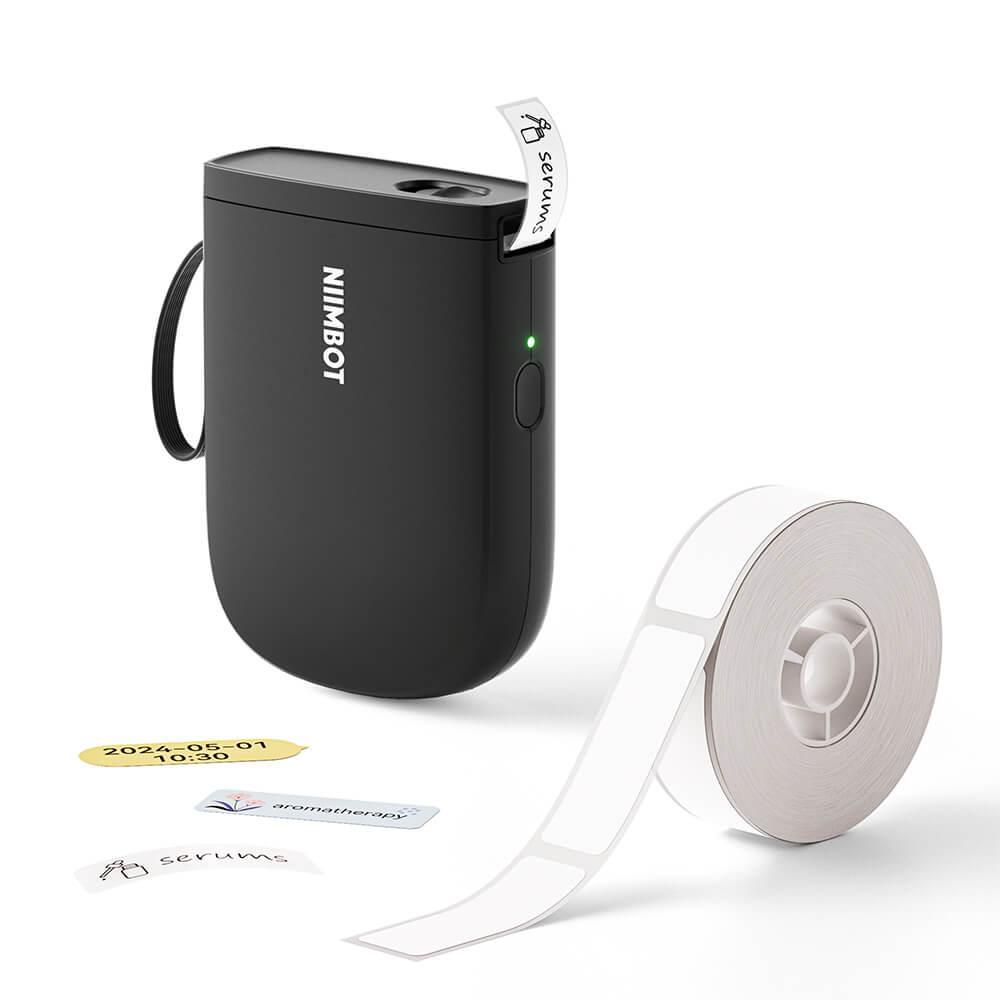
What Is NIIMBOT?
NIIMBOT is a label-printing brand focused on smart labeling machines, thermal printing hardware, labeling software, and consumables. The company’s official product ecosystem includes portable label makers, desktop-style business printers, color-printing solutions, specialized printers, and compatible label tapes.
The current NIIMBOT catalog is considerably broader than the small label makers that are often associated with the brand. The official site currently separates products into categories such as home-use label makers, business label makers, color printing, and different label-paper systems.
That distinction is important because a D-series printer and an M-series printer are designed for very different buyers.
NIIMBOT Product Range Explained
Instead of asking whether one NIIMBOT printer is “the best,” it makes more sense to choose a series according to what you actually need to print.
| Series / Model | Best suited for | Why consider it |
|---|---|---|
| D11 / D110 | Home, school, basic organization | Small portable label makers designed for everyday labeling |
| D101 | Larger labels and organization | 1-inch label-printing format |
| B1 / B1 Pro | Small businesses and retail | Business-oriented label printing with broader applications |
| B21 Pro | Home and creative use | Higher-resolution labeling and broader creative applications |
| M2 / M3 | Business and specialized labeling | Designed for more demanding labeling applications and wider use cases |
NIIMBOT’s official hardware catalog currently includes D-series portable printers alongside B-series printers in 2-, 3-, and 4-inch formats, plus other specialized models. :contentReference[oaicite:3]{index=3}
NIIMBOT D11 Review
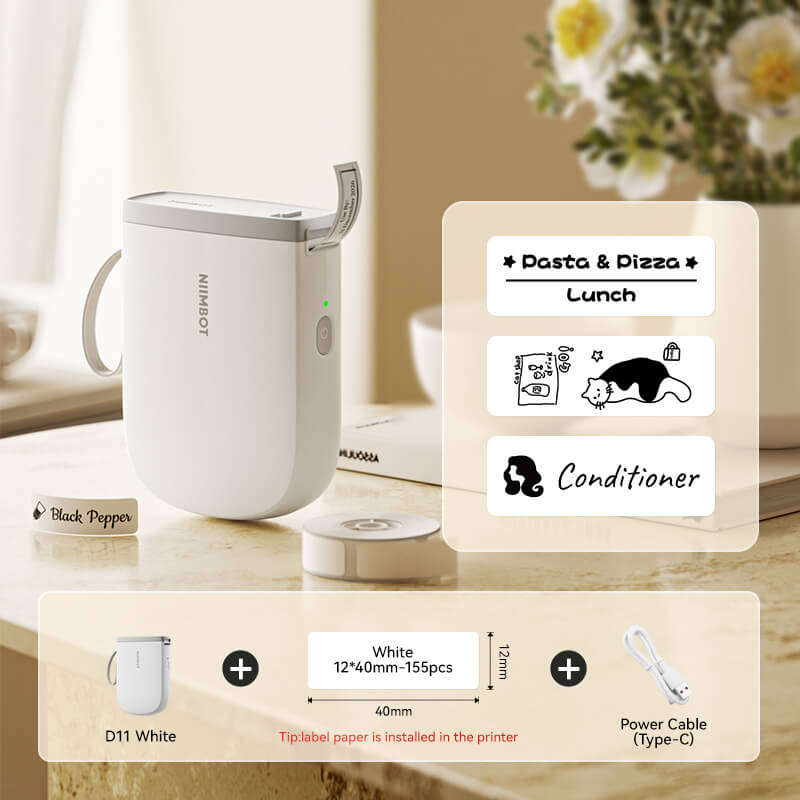
The D11 is one of the easiest NIIMBOT models to understand. It is a compact thermal label printer designed for home, school, office, and everyday organization.
The upgraded D11 listed on NIIMBOT’s store uses 300dpi printing, Bluetooth connectivity, and a mobile-app workflow. The manufacturer says it can print at up to 50mm/s and supports automatic label calibration. It is designed for fixed-length labels rather than continuous label tape.
The D11 connects to mobile devices through the NIIMBOT app or NIIM app. According to the product page, it supports up to six mobile phones and offers templates for text, symbols, logos, barcodes, QR codes, images, and other label elements.
One important limitation is also clearly stated by NIIMBOT: the upgraded D11 is designed for mobile Bluetooth connection and is not compatible with computers or tablets.
See NIIMBOT D-Series Options →
Who should consider the D11?
- People organizing kitchens, storage boxes, drawers, and personal belongings.
- Parents labeling children’s school items.
- Students and office users who want small identification labels.
- Small sellers who only need simple product or packaging labels.
- Anyone who wants a compact printer that can be used from a phone.
Who should look beyond the D11?
- Users who need computer-based printing.
- Businesses that need larger label formats.
- Users who need continuous labels.
- People printing high volumes of professional business labels.
What About the D110?
The D110 occupies a similar compact category but is positioned as another portable Bluetooth label maker for home, office, and school use. The current NIIMBOT storefront lists the D110 in multiple colors and with different label-roll bundles.
This makes the D110 relevant for buyers who want a small everyday label maker but do not necessarily need a larger business printer.
Before buying, check the supported label sizes and the specific bundle you are selecting. NIIMBOT sells different consumables for its different printer families, so the label ecosystem is an important part of the purchase.
NIIMBOT D101: When You Need Bigger Labels
The D101 is positioned in NIIMBOT’s official hardware catalog as a 1-inch portable smart label printer. That gives it a different role from the smaller half-inch D-series machines.
If your labeling needs involve larger identification areas, storage organization, cable labeling, product information, or applications where a very small label is simply too restrictive, the D101 deserves consideration.
The key buying question is not simply whether the D101 costs more or less than another NIIMBOT printer. It is whether the label dimensions and format match what you plan to print.
NIIMBOT B Series: A Better Fit for Business Users?
The B series moves NIIMBOT further into business-oriented labeling. The current official catalog includes models such as the B1 Pro, B21 Pro, B31, B3S, B4 and other business label printers.
For a small retailer, online seller, flower shop, coffee business, or other operation that regularly produces labels, a business-oriented NIIMBOT model may make more sense than buying an ultra-compact D-series printer.
The official NIIMBOT store also organizes label products around business scenarios including logistics, retail, coffee, flowers, jewelry, beauty, bottles, and medical labeling. That gives you a better idea of how broad the intended use cases have become.
A simple buying rule
Occasional home labeling? Start with the D series.
Larger labels or more serious small-business use? Look at the B series.
Specialized or more advanced business printing? Explore the M series and compare the exact printing technology and consumables required.
NIIMBOT M2 and M Series
The M series is aimed at more specialized applications than the smallest portable label makers. The current NIIMBOT storefront lists M2 products for areas such as business labeling, coffee, vial bottles, kitchen management, and industrial nameplates.
The M2 is particularly interesting for buyers who need a more specialized labeling workflow rather than simple household organization.
This is also where it becomes especially important to read the individual product specifications. The phrase “NIIMBOT printer” does not describe a single printing technology or capability across the entire catalog.
Compare NIIMBOT Business Printers →
What Makes NIIMBOT Different?
1. A broad hardware ecosystem
NIIMBOT is not limited to one portable label maker. Its official catalog covers compact D-series machines, B-series business printers, M-series models, specialized printers, and multiple categories of compatible consumables.
2. Mobile-first printing on many compact models
Models such as the D11 use Bluetooth and a mobile application instead of requiring a traditional computer setup. For everyday labeling, that can make the workflow simpler and more portable.
3. Multiple label formats
One of the strongest reasons to consider NIIMBOT is the variety of label sizes and styles available across the ecosystem. However, this is also why buyers need to verify compatibility before ordering additional label rolls.
4. Thermal printing
Many NIIMBOT printers use thermal printing, which means you do not need conventional ink cartridges for those models. The exact printing technology varies by product, so check the specifications of the particular printer before purchasing.
Pros and Cons of NIIMBOT
Pros
- Large range of portable and business-oriented label printers.
- Compact models are convenient for home and mobile use.
- Many models work through Bluetooth and mobile apps.
- Wide selection of compatible label tapes and formats.
- Suitable for both personal organization and small-business applications.
- Multiple specialized use cases across the catalog.
Cons
- The product range can be confusing for first-time buyers.
- Different printers require different compatible labels.
- Some compact models have mobile-only connectivity.
- The most suitable model depends heavily on label size and intended use.
- Consumables are an ongoing cost that should be included in the buying decision.
Is NIIMBOT Worth It?
NIIMBOT makes the most sense when you have a recurring need for labels. If you only need a handful of labels once or twice a year, a dedicated label printer may not provide much additional value.
For people who regularly organize storage, label products, manage inventory, prepare packages, identify cables, organize school supplies, or run a small retail operation, the convenience of having a dedicated printer can be much more meaningful.
The value also depends on choosing the correct model. A cheap compact printer is not necessarily the right purchase if you eventually need wider labels, computer connectivity, or a different printing format.
NIIMBOT Shipping and Returns
NIIMBOT’s current shipping policy says orders are generally processed within 1–3 business days. The policy lists estimated delivery of 6–10 days for EU countries and states that NIIMBOT covers customs fees for standard shipping to EU countries. Actual delivery can vary by destination, warehouse availability, carrier, and customs conditions.
The return policy currently states that customers have 30 days after receiving the product to make a return, with the return cost paid by the customer and no restocking fee. The policy also contains specific conditions for damaged deliveries and delayed shipments.
Because shipping and return conditions can change, buyers should check the applicable policy before ordering, particularly when purchasing from a regional storefront.
Check Current NIIMBOT Options →
Which NIIMBOT Should You Buy?
NIIMBOT vs. a Basic Label Maker
| Factor | NIIMBOT | Basic label maker |
|---|---|---|
| Product variety | Broad range of models and label formats | Usually more limited |
| Portability | Strong on compact models | Often portable |
| Mobile printing | Available on many models | Depends on model |
| Business applications | Several dedicated business models | Often limited |
| Consumables | Model-specific label ecosystem | Varies |
| Best use | Users who want a flexible labeling ecosystem | Simple occasional labeling |
Is NIIMBOT Legit?
NIIMBOT has an established official website, dedicated product-support infrastructure, multiple regional storefronts, a published shipping policy, a published return policy, and a formal affiliate program. Its official materials state that the company was founded in 2012 and has customers worldwide.
Those are useful indicators that NIIMBOT is operating as an established commercial brand rather than an anonymous one-product storefront. However, legitimacy and product suitability are different questions. Buyers should still evaluate the specific printer, compatible labels, shipping terms, and return conditions before purchasing.
Frequently Asked Questions
Is NIIMBOT a good label printer brand?
NIIMBOT offers a broad range of label printers rather than one single product. The brand is particularly relevant if you want a choice between compact home printers and larger business-oriented models. The right choice depends on label size, connectivity, printing volume, and your intended application.
Does NIIMBOT work with a phone?
Many NIIMBOT portable models use Bluetooth and a mobile application. For example, the D11 product page states that the printer connects through the NIIMBOT app or NIIM app. However, connectivity varies by model, so check the individual specifications before buying.
Can NIIMBOT print QR codes?
According to the D11 product page, its mobile app includes templates and tools for creating labels containing QR codes, barcodes, text, symbols, logos, and images. Other NIIMBOT printers can have different capabilities, so the specific model should be checked before purchase.
Does NIIMBOT require ink?
Many NIIMBOT label printers use thermal printing, meaning they do not use conventional ink cartridges. The exact printing method depends on the printer, so check the specifications for the model you are considering.
Can NIIMBOT print from a computer?
This depends on the model. The D11 product page specifically states that the upgraded D11 uses mobile Bluetooth connectivity and is not compatible with computers or tablets. Business-oriented NIIMBOT models can have different connection options.
Are NIIMBOT labels interchangeable?
Not necessarily. NIIMBOT sells different label categories for different printer families, including dedicated labels for D11/D110/D101, B-series models, and M-series models. Always verify compatibility before purchasing replacement rolls.
Final Verdict: Should You Consider NIIMBOT?
NIIMBOT is most interesting for buyers who want more than a basic label maker. Its current ecosystem covers compact home printers, portable business models, larger-format printers, specialized machines, and a wide range of consumables.
The biggest advantage is choice. You can start with a compact D-series printer for everyday organization or move toward a B- or M-series machine when your labeling requirements become more demanding.
The biggest drawback is the same thing: choice can make the catalog harder to navigate. Before buying, decide what label size you need, whether you want phone or computer connectivity, how frequently you will print, and whether you need specialized features.
For casual home organization, the D11 or D110 are logical places to start. For larger or more business-focused labeling requirements, compare the B and M ranges instead of automatically choosing the smallest printer.